
Take a PDF drawing into DWG using DXF.
PDF Craft’s direct CAD output is DXF. If your next step needs DWG, use the DXF as an intermediate file and complete the save in compatible CAD software. This guide explains the two stages and what to check.
Getting started
- Install or update PDF Craft from Microsoft Store on Windows 11, 64-bit. Converters require app version 1.15.1 or later; check Help → About.
- Sign in with Pro or an active trial. Conversion is included in every Pro plan.
- Keep the source PDF and check the converted file before using or sharing it.
Know which app does each step
PDF Craft Pro exports the supported PDF vector content to DXF. Your CAD application must support opening DXF and saving DWG; check its supported formats and any licence requirements.
Check content and scale
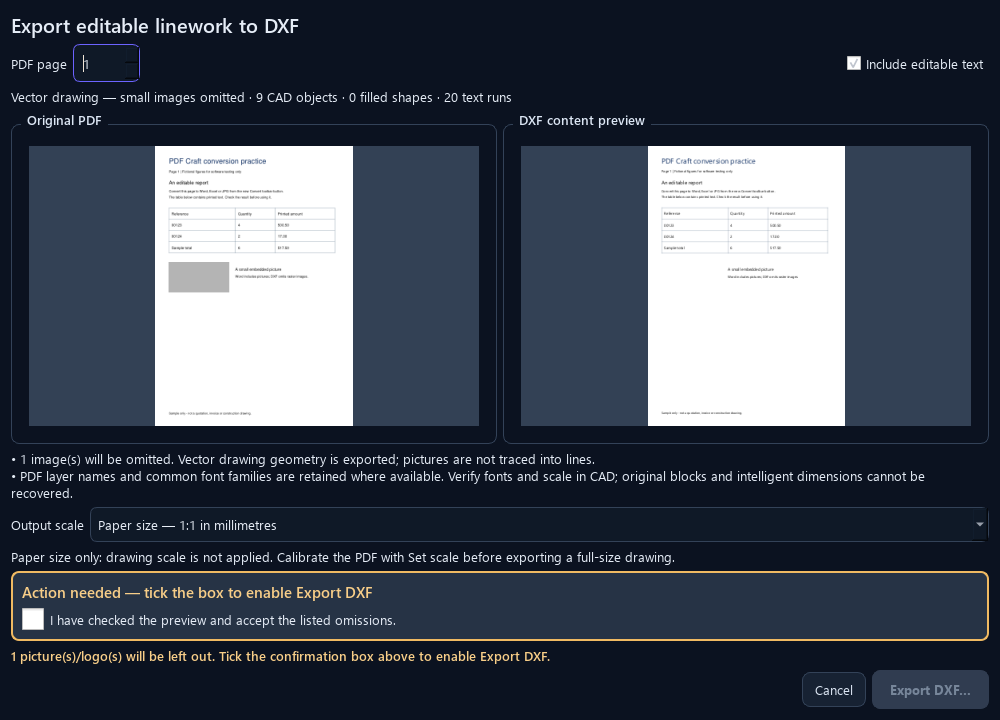
A PDF can lose the original CAD blocks, layers, intelligent dimensions and model-space organisation. PDF Craft retains supported PDF layer names and geometry where available, but cannot reconstruct those lost CAD semantics. Scans and raster pictures are not traced into editable lines.
Choose the file, convert and check the result
Each click starts with a new PDF file selection. Cancelling the picker does not convert the last document.
Export a checked DXF
Follow the PDF to DXF guide: choose your PDF, inspect the preview and omissions, set the scale and save the file.
1Choose this converterOpen Convert and select the tool you need. The next action opens the PDF file picker.
Real PDF Craft screenshot · guide markers addedOpen it in your CAD software
Open the DXF in a CAD application that supports the format. Inspect the complete sheet and check the units against a known dimension.
Use the CAD applicationOpen DXFCheck geometryVerify unitsThe CAD application performs the DWG save; PDF Craft supplies the DXF.
Workflow checkSave as DWG there
Use that CAD application’s Save As or export function and choose the DWG version needed by the recipient. Reopen the saved DWG and check it before sharing.
Check the DWGRequired DWG versionReopen the fileKnown dimensionChoose a compatible DWG version and verify the saved result in your CAD workflow.
Workflow check
Your questions answered
Can I select DWG in PDF Craft’s export dialog?
No. The supported direct CAD format is DXF. The final DWG save is performed in a compatible CAD program.
Does this restore the original CAD drawing?
No. It recovers supported vector information available in the PDF. Original blocks, intelligent dimensions, 3D solids or information already lost when making the PDF cannot be recreated by changing the file format.
Put it into practice.
Start with the Free reader. Choose Pro for editing, measurement, page tools and PDF conversion.