
Convert vector PDF drawings to editable DXF.
Bring supported drawing content into CAD without tracing every line again. PDF Craft Pro exports existing vector lines, curves, supported fills and optional text as DXF, with an original-versus-output preview before you save.
Getting started
- Install or update PDF Craft from Microsoft Store on Windows 11, 64-bit. Converters require app version 1.15.1 or later; check Help → About.
- Sign in with Pro or an active trial. Conversion is included in every Pro plan.
- Keep the source PDF and check the converted file before using or sharing it.
Convert locally on your PC
PDF conversion happens on your computer. Your PDFs are not uploaded for conversion. Account sign-in and licence checks use the PDF Craft account service.
A PDF drawing needs vector linework
A sharp-looking sheet may contain vector paths, raster pictures or both. Existing supported vector content can become editable CAD objects. Image-only pages cannot export as editable drawings; scanned lines and photographs are not traced.
What the DXF keeps
Supported lines, cubic curves and filled boundaries are retained. PDF layer names, colours, lineweights, dash patterns and common fonts are kept where available. Complex clipping or effects can still cause omissions; use the preview and warnings to check.
Keep the drawing scale explicit
Paper size means PDF sheet millimetres, not full-size model geometry. For known full-size units, calibrate the PDF with Set scale before exporting and choose Calibrated drawing. A sheet with multiple differently scaled views cannot be restored to every original model-space scale by one setting.
DXF and DWG are different outputs
PDF Craft writes DXF. A compatible CAD program can open the DXF and save as DWG. Original CAD blocks, 3D solids and intelligent dimensions are not reconstructed from the PDF.
Choose the file, convert and check the result
Each click starts with a new PDF file selection. Cancelling the picker does not convert the last document.
Choose the CAD converter and PDF
Open Convert, click Export DXF and select your drawing. Choose the PDF page in Export PDF to CAD.
1Choose this converterOpen Convert and select the tool you need. The next action opens the PDF file picker.
Real PDF Craft screenshot · guide markers addedInspect the two previews
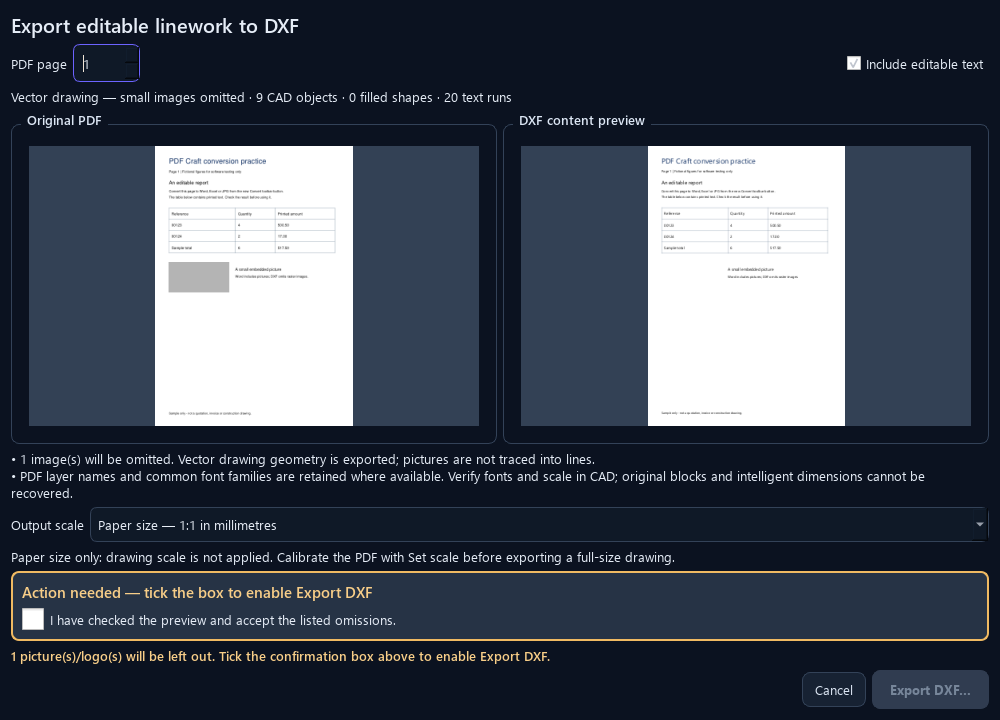
Compare Original PDF with DXF content preview. Read the status and listed omissions. Check that the drawing geometry you need is visible; raster photos and logos are omitted.
1Compare the original and DXFBoth previews show a fictional sample PDF; the raster picture is omitted from the DXF.
Real PDF Craft screenshot · guide markers addedSet the output scale
Select Calibrated drawing when you have established a known real-world scale. Otherwise Paper size exports the sheet in millimetres. Include editable text only if you want it in CAD.
1Output scaleThis example uses Paper size. Use an established calibration when you need full-size drawing units.
Real PDF Craft screenshot · guide markers addedConfirm listed omissions
When the amber Action needed panel is shown, check the preview and tick the confirmation box. The panel explains why Export DXF is disabled and how to enable it.
1Confirm omissions2Export DXFTick the highlighted confirmation after checking the omitted content. The export button then becomes available.
Real PDF Craft screenshot · guide markers addedExport and verify in CAD
Choose Export DXF and save a .dxf file. Open it in your CAD program, inspect layers, linework, fills and text, and verify a known dimension before using it for further work.
Verify the CAD drawingKnown dimensionUnitsLinework and fillsText and layersDo not assume that the original CAD file’s structure or scale has been recovered.
Workflow check
Your questions answered
Why is Export DXF greyed out?
If there is exportable vector linework, inspect the amber confirmation panel and tick its omissions checkbox. Image-only pages have no editable drawing lines to export.
Can it convert a scanned drawing into CAD lines?
No. This exporter uses vector geometry already present in the PDF. Photos and scanned drawing lines are not automatically traced.
Is PDF to DXF included in my Pro plan?
Yes. CAD/DXF export is included with every Pro billing period and active trials; it is not an additional paid converter.
Does this create DWG files?
The direct output is DXF. Open it in compatible CAD software, verify the geometry and units, then save it as DWG there.
Put it into practice.
Start with the Free reader. Choose Pro for editing, measurement, page tools and PDF conversion.